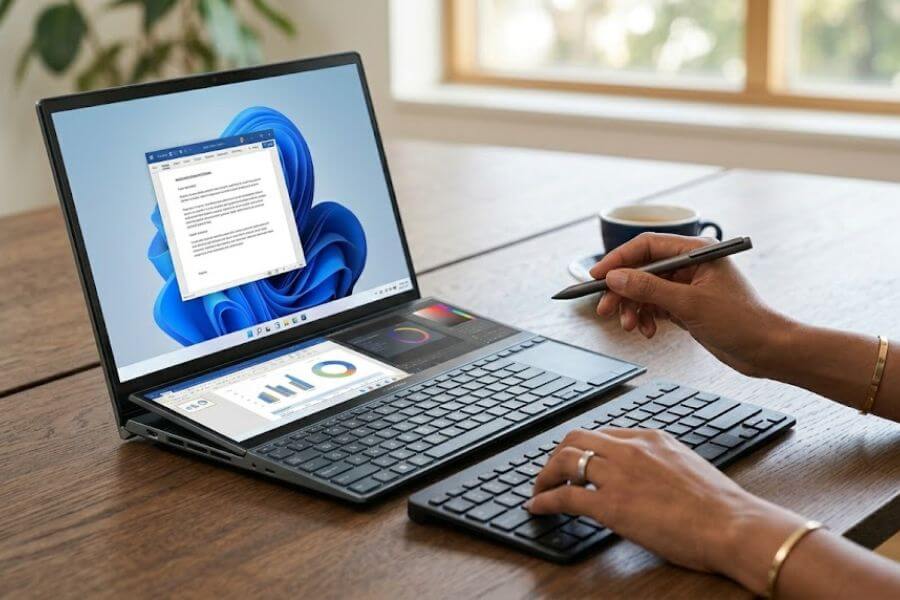
Do you ever find yourself constantly switching between browser tabs, spreadsheets, and chat windows while working on your laptop? It can feel like trying to cook a five-course meal on a single small hotplate. Traditional laptops are great, but for multitasking professionals who need to manage multiple projects at once, one screen is often not enough.
That is where dual-screen laptops come into play. These innovative machines give you twice the screen real estate without making you carry a heavy desktop monitor in your backpack. Whether you want a full second display or a smaller touch-sensitive strip above your keyboard, the market now offers incredible choices that can change how you work. Let us dive into the absolute best options available right now to help you find your perfect mobile workstation.
Quick Summary Table
| Laptop Model | Primary Target Audience | Key Standout Feature |
| ASUS Zenbook DUO | Creative Professionals & Executives | Dual full-size 14-inch OLED screens with detachable keyboard |
| Lenovo Yoga Book 9i | Remote Workers & Presenters | Versatile origami-style stand with dual stacked displays |
| ASUS ROG Zephyrus Duo | Gamers & Video Editors | Secondary tilting screen above keyboard with high-end graphics |
| HP Spectre Foldable | Luxury Tech Enthusiasts | Single giant folding screen that acts as a continuous dual display |
| Lenovo ThinkBook Plus | Business Managers & Note-Takers | Exterior secondary ink screen for easy reading and fast notes |
How We Ranked These
We did not just look at the coolest designs to make this list. To find the very best dual-screen laptops for serious multitasking, we carefully evaluated each device against four core factors that matter most in your daily workday:
- Screen Usability: How easily the software allows you to move windows between the two screens, and whether the displays are bright enough for indoor and outdoor work.
- Processing Power: The strength of the internal hardware to ensure the laptop can run multiple heavy apps simultaneously without freezing or slowing down.
- Battery Endurance: Dual displays consume significantly more energy, so we heavily favored laptops with smart power management and large battery capacities.
- Build Quality and Portability: The strength of the hinges and how easy it is to fold the device up and slide it into a standard travel bag.
1. ASUS Zenbook DUO
The ASUS Zenbook DUO completely changes what a mobile setup can look like. Instead of a traditional keyboard, opening this laptop reveals two full-size 14-inch gorgeous displays stacked on top of each other. It comes with a very thin, magnetic Bluetooth keyboard that rests on top of the lower screen when you want to use it like a regular laptop. When you need to multitask, you simply pop the keyboard off, pull out the built-in kickstand on the back, and enjoy a massive vertical workspace. This design gives you the true freedom of a dual-monitor desktop anywhere you go.
2. Lenovo Yoga Book 9i
If you want absolute flexibility in how you position your screens, the Lenovo Yoga Book 9i is a fantastic choice. This device features two identical 13.3-inch touchscreens connected by a sturdy 360-degree hinge. What makes it special is the clever folding folio stand that comes in the box. You can prop the screens up side-by-side like an open book, or stack them vertically on top of each other. Combined with a wireless keyboard and a digital stylus pen, it allows you to adapt your workspace to fit tight coffee shop tables or deep office desks perfectly.
3. ASUS ROG Zephyrus Duo
Not every professional wants two identical screens, and that is where this powerful machine excels. Designed for high-end creators, engineers, and gamers, it features a traditional layout but includes a wide secondary touchscreen directly above the keyboard. When you open the laptop lid, this lower screen automatically tilts upward at an angle. This smart mechanic reduces neck strain and opens up extra cooling vents underneath to keep the computer running fast. It is the ultimate tool if you want to keep your main app full-screen while tracking chat logs, video timelines, or system stats below.
4. HP Spectre Foldable
This premium device takes a slightly different approach to the dual-screen concept by using a single, massive 17-inch folding display. When you bend it at a 90-degree angle, the software automatically splits the screen into two separate 12.5-inch workspaces. You can place the included physical keyboard over the bottom half to use it as a compact travel laptop, or slide the keyboard down to reveal a smaller secondary screen. If you open it completely flat, it transforms into a giant tablet that is perfect for editing large blueprints or drawing detailed illustrations.
5. Lenovo ThinkBook Plus
This laptop is built specifically for professionals who spend hours reading documents and attending long meetings. It features a beautiful main display on the inside, but when you close the lid, you will find a secondary paper-like display on the outside. This outer screen uses specialized low-power technology that is incredibly easy on the eyes, even in direct sunlight. You can use the included stylus to write down notes during a meeting or review long PDF reports without opening the laptop, which saves an immense amount of battery life.
Conclusion
Upgrading to a dual-screen laptop is one of the fastest ways to boost your daily productivity. Whether you choose the massive screen space of the ASUS Zenbook DUO or the unique eye-saving secondary display on the Lenovo ThinkBook Plus, these machines eliminate the frustration of cramped single-screen setups. While they generally cost more than standard laptops, the time you save from not constantly minimizing windows makes them a highly valuable investment for any serious multitasking professional.
Frequently Asked Questions
Can I use a regular computer mouse with these dual-screen setups?
Yes, absolutely. All of these laptops run on standard operating systems like Windows, meaning you can connect any wired, wireless, or Bluetooth mouse just like you would on a normal computer. The mouse pointer will glide smoothly from one screen to the other as if they were a single continuous display.
Do these laptops support digital stylus pens for drawing or writing?
Most of them do. Models like the Lenovo Yoga Book 9i, HP Spectre Foldable, and Lenovo ThinkBook Plus are specifically designed with touchscreens that support active digital styluses. These pens often come included in the box, allowing you to sign digital documents, sketch ideas, or take handwritten notes directly on the screens.
How heavy are dual-screen laptops compared to traditional models?
While they do pack extra glass and complex hinges, manufacturers have made incredible progress in keeping them lightweight. Most of the options on our list weigh between three and five pounds. This makes them slightly heavier than ultra-thin traditional laptops, but still very easy to carry around in a backpack or briefcase.
Can I disable the second screen if I want to save battery power?
Yes, every single one of these laptops features built-in software shortcuts or physical buttons that allow you to turn off the secondary display instantly. Turning off the extra screen is a great trick when you are running low on power and only need to focus on a single task, like writing an email.
Do dual-screen laptops get much hotter than standard laptops?
Because running two screens generates more internal heat, these laptops utilize highly advanced cooling systems. For example, the ASUS ROG Zephyrus Duo physically lifts its second screen to maximize airflow. As long as you use the laptop on a flat, hard surface, internal temperatures will stay safely regulated during heavy multitasking.