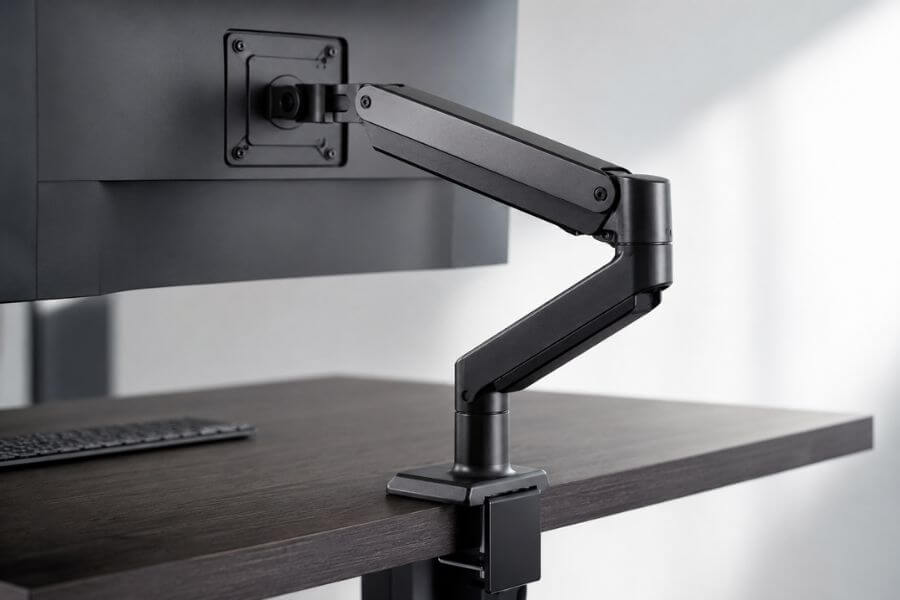
A messy desk can make even the best workspace feel stressful. Loose cables, bulky monitor stands, and poor screen positioning often take up valuable room and make your setup look crowded. That is where a good monitor arm can completely change your workspace.
The best monitor arms help you free up desk space, improve posture, reduce neck strain, and create a cleaner overall setup. Whether you work from home, game for hours, edit videos, or simply want a more organized desk, the right monitor arm can make your workspace feel bigger and more comfortable.
In this guide, you will find the 10 best monitor arms for a cleaner desk setup. Some are perfect for budget buyers, while others are built for heavy ultrawide displays and premium office setups.
Quick Summary Table ⚡
| Monitor Arm | Best For | Monitor Size Support | Weight Capacity | Mount Type |
|---|---|---|---|---|
| Ergotron LX | Overall premium choice | Up to 34 inches | 25 lbs | Clamp/Grommet |
| HUANUO Single Monitor Arm | Budget setups | Up to 32 inches | 19.8 lbs | Clamp/Grommet |
| Jarvis Single Monitor Arm | Minimalist desks | Up to 32 inches | 19.8 lbs | Clamp |
| VIVO Dual Monitor Arm | Dual monitor users | Up to 32 inches | 22 lbs each | Clamp/Grommet |
| Amazon Basics Premium Arm | Smooth movement | Up to 34 inches | 25 lbs | Clamp |
| WALI Monitor Arm | Small desks | Up to 27 inches | 14.3 lbs | Clamp |
| AVLT Heavy Duty Arm | Ultrawide monitors | Up to 49 inches | 33 lbs | Clamp/Grommet |
| Mount-It! Gas Spring Arm | Adjustable comfort | Up to 32 inches | 19.8 lbs | Clamp/Grommet |
| NB North Bayou F80 | Affordable flexibility | Up to 30 inches | 19.8 lbs | Clamp |
| Humanscale M2.1 | Premium office setups | Up to 35 inches | 20 lbs | Clamp |
How We Ranked These Monitor Arms 🎯
We looked at the features that matter most for everyday desk setups and long-term comfort.
Build Quality
A monitor arm should feel stable and strong. We prioritized models with durable metal construction and reliable joints that do not wobble over time.
Ease of Installation
Nobody wants to spend hours setting up a monitor arm. We chose options with simple instructions and beginner-friendly mounting systems.
Cable Management
A cleaner desk setup depends heavily on hidden cables. We ranked products higher when they included built-in cable routing systems.
Range of Motion
The best monitor arms allow you to tilt, rotate, swivel, and adjust height easily for better ergonomics.
Weight Support
Not all monitor arms can handle large screens. We considered how well each arm supports ultrawide and heavy monitors.
Value for Money
Some premium arms are expensive, but they also last for years. We balanced price with overall performance and features.
1. Ergotron LX Monitor Arm 🏆
The Ergotron LX is one of the most trusted monitor arms available today. If you want something that feels premium, moves smoothly, and lasts for years, this is an excellent choice.
The arm offers effortless adjustments with very little force. You can easily raise, lower, tilt, or rotate your monitor without dealing with stiffness. This makes it ideal if you constantly switch positions during work.
Its cable management system keeps wires tucked neatly inside the arm, which instantly makes your desk look cleaner. The overall design also looks modern without being distracting.
Another big advantage is reliability. Many users keep this monitor arm for years without noticing sagging or weak joints.
Pros
- Extremely smooth movement
- Strong build quality
- Great cable management
- Excellent ergonomic adjustments
Cons
- Expensive compared to budget options
- Single monitor version only
2. HUANUO Single Monitor Arm 💰
If you want a cleaner desk setup without spending too much money, the HUANUO monitor arm is a fantastic budget option.
Despite the lower price, it still offers gas spring movement for smooth adjustments. You can reposition your monitor easily throughout the day.
The installation process is beginner-friendly, and the included cable clips help reduce desk clutter quickly. It also supports both clamp and grommet mounting methods, which gives you more flexibility.
This arm works especially well for home office setups with standard monitor sizes.
Pros
- Affordable price
- Easy setup process
- Smooth adjustments
- Compact design
Cons
- Less premium feel
- Not ideal for very heavy monitors
3. Jarvis Single Monitor Arm ✨
The Jarvis monitor arm focuses heavily on clean aesthetics and modern desk organization. If you care about minimalism, this is one of the best-looking options available.
The arm blends nicely with standing desks and modern office furniture. It keeps your monitor floating cleanly above your desk surface, which creates a more open workspace.
Its movement feels smooth and stable, and the cable routing system hides wires effectively. The slim design also prevents the setup from looking bulky.
For remote workers who value appearance just as much as functionality, this arm delivers both.
Pros
- Sleek minimalist design
- Excellent cable hiding
- Strong stability
- Great for modern desks
Cons
- Premium pricing
- Limited heavy monitor support
4. VIVO Dual Monitor Arm 🖥️
If you use two monitors, the VIVO Dual Monitor Arm is one of the best value choices available.
It allows both screens to move independently, making it easier to create a comfortable viewing angle. You can also rotate the monitors vertically if needed for coding or productivity tasks.
The arm frees up a surprising amount of desk space by removing bulky monitor stands. Built-in cable clips help prevent wire clutter between both displays.
For people working with spreadsheets, editing software, or multitasking setups, this arm can dramatically improve workflow.
Pros
- Great for dual monitor setups
- Strong value for money
- Adjustable viewing angles
- Good cable management
Cons
- Takes time to balance properly
- Can feel bulky on very small desks
5. Amazon Basics Premium Monitor Arm 📦
The Amazon Basics Premium Monitor Arm is popular because it offers premium performance at a lower price than many high-end competitors.
It is actually known for having movement quality similar to far more expensive models. The arm glides smoothly and stays stable once positioned.
This arm works especially well for people who frequently reposition their monitors throughout the day. It also supports larger screens comfortably.
Its simple design fits nicely into both gaming and office setups without drawing too much attention.
Pros
- Smooth and stable adjustments
- Excellent value
- Supports larger monitors
- Durable construction
Cons
- Design feels plain
- Slightly heavier installation process
6. WALI Monitor Arm 🧩
The WALI monitor arm is perfect for compact workspaces and lighter monitors. If your desk space is limited, this arm helps maximize every inch.
Its lightweight structure keeps the setup simple while still improving ergonomics and cable organization. It also works well for students, casual users, and smaller office desks.
The arm supports tilting and rotating adjustments, making it easier to maintain better posture while working.
For basic desk organization needs, this is a reliable and affordable solution.
Pros
- Compact footprint
- Budget friendly
- Easy installation
- Good for smaller desks
Cons
- Limited weight capacity
- Fewer premium features
7. AVLT Heavy Duty Monitor Arm 🚀
Large ultrawide monitors need serious support, and the AVLT Heavy Duty Monitor Arm handles them extremely well.
This arm is designed for massive displays, including heavy curved ultrawide monitors that many standard arms cannot safely support.
The movement stays surprisingly smooth despite the higher weight capacity. The heavy-duty clamp also keeps everything stable during adjustments.
If you use a large gaming monitor or productivity ultrawide display, this arm helps keep your setup clean without sacrificing stability.
Pros
- Excellent for ultrawide monitors
- Very stable construction
- Smooth movement
- Strong cable management
Cons
- Larger overall size
- More expensive than standard arms
8. Mount-It! Gas Spring Monitor Arm 🔧
The Mount-It! Gas Spring Monitor Arm balances affordability and flexibility very well.
Its gas spring system allows quick adjustments with little effort. This makes it useful for people who alternate between sitting and standing throughout the day.
The arm also includes decent cable management channels that help reduce visible clutter around your desk.
The overall design is practical and versatile for most standard home office setups.
Pros
- Smooth height adjustment
- Good ergonomic support
- Reasonable pricing
- Easy cable organization
Cons
- Plastic parts in some areas
- Slight wobble with heavier monitors
9. NB North Bayou F80 🌟
The NB North Bayou F80 has become a favorite among budget-conscious buyers because it delivers impressive flexibility for the price.
The arm supports full monitor movement, including tilt, swivel, and rotation. It also has a surprisingly modern appearance compared to many cheaper alternatives.
Installation is relatively simple, and the arm works well for gaming setups, home offices, and casual workstations.
For buyers who want affordable functionality without sacrificing too much quality, this arm stands out.
Pros
- Very affordable
- Smooth motion
- Modern design
- Good beginner option
Cons
- Not ideal for very heavy displays
- Long-term durability varies
10. Humanscale M2.1 Monitor Arm 🪑
The Humanscale M2.1 is a premium office monitor arm built for users who want top-tier ergonomics and clean aesthetics.
The design looks incredibly polished and professional, making it a popular choice in high-end office environments. The movement feels smooth and balanced without requiring constant adjustments.
Its lightweight appearance also helps the desk feel more open and uncluttered.
While expensive, this arm is built for long-term daily use and comfort.
Pros
- Premium office appearance
- Excellent ergonomics
- Smooth monitor adjustments
- Durable long-term design
Cons
- High price point
- Better suited for professional setups
Conclusion 🎉
A quality monitor arm can completely transform your workspace. It creates more desk space, improves comfort, helps reduce neck strain, and makes your setup look far cleaner and more organized.
If you want the best overall experience, the Ergotron LX remains one of the strongest choices thanks to its premium build and smooth movement. If you are shopping on a tighter budget, the HUANUO and NB North Bayou F80 offer excellent value without sacrificing important features.
For dual monitor users, the VIVO Dual Monitor Arm delivers flexibility and productivity benefits at a reasonable price. Meanwhile, ultrawide monitor owners should strongly consider the AVLT Heavy Duty Arm for its superior support and stability.
The best choice ultimately depends on your monitor size, desk space, and daily workflow. Once you switch to a good monitor arm, it becomes difficult to imagine going back to a traditional monitor stand.
Frequently Asked Questions ❓
Are monitor arms safe for expensive monitors?
Yes, high-quality monitor arms are designed to safely support monitors within their listed weight limits. Always check your monitor’s weight and VESA compatibility before buying.
Do monitor arms damage desks?
Most monitor arms include protective padding on their clamps to prevent desk damage. Proper installation is important, especially for softer wood desks.
Can monitor arms improve posture?
Yes, monitor arms help position your screen at eye level, which can reduce neck strain, shoulder tension, and poor sitting posture.
What is VESA compatibility?
VESA refers to the mounting pattern on the back of your monitor. Most monitor arms support standard VESA sizes like 75x75mm or 100x100mm.
Are monitor arms worth it for small desks?
Absolutely. Monitor arms are especially useful for small desks because they free up valuable surface space by removing bulky monitor stands.